
The estimate that becomes your job budget.
Price each job from your real costs, send a clean proposal, then see your margin while the job runs. It's one spreadsheet kit for a one-time price, with no monthly fee and no seat fees.
Not on sale yet. Join the waitlist and we'll email you when launch pricing opens. No payment is taken.
- Excel workbook (.xlsx), no macros
- US · UK · Canada · Australia · Europe settings
- Imperial or metric
Most underpriced jobs look fine on paper
Three mistakes eat contractor profit quietly. The workbook is built to make each one visible before you send the price.
Markup isn't margin
A 25% markup on cost is only a 20% margin on the price. The Estimate shows margin and markup side by side, and a margin guard flags any job below your target or your minimum.
Labour priced at the wage
Payroll taxes, insurance and unpaid time make an hour of labour cost more than the wage. You enter a burden % per crew role, and every estimate line uses the burdened rate.
Profit found out afterwards
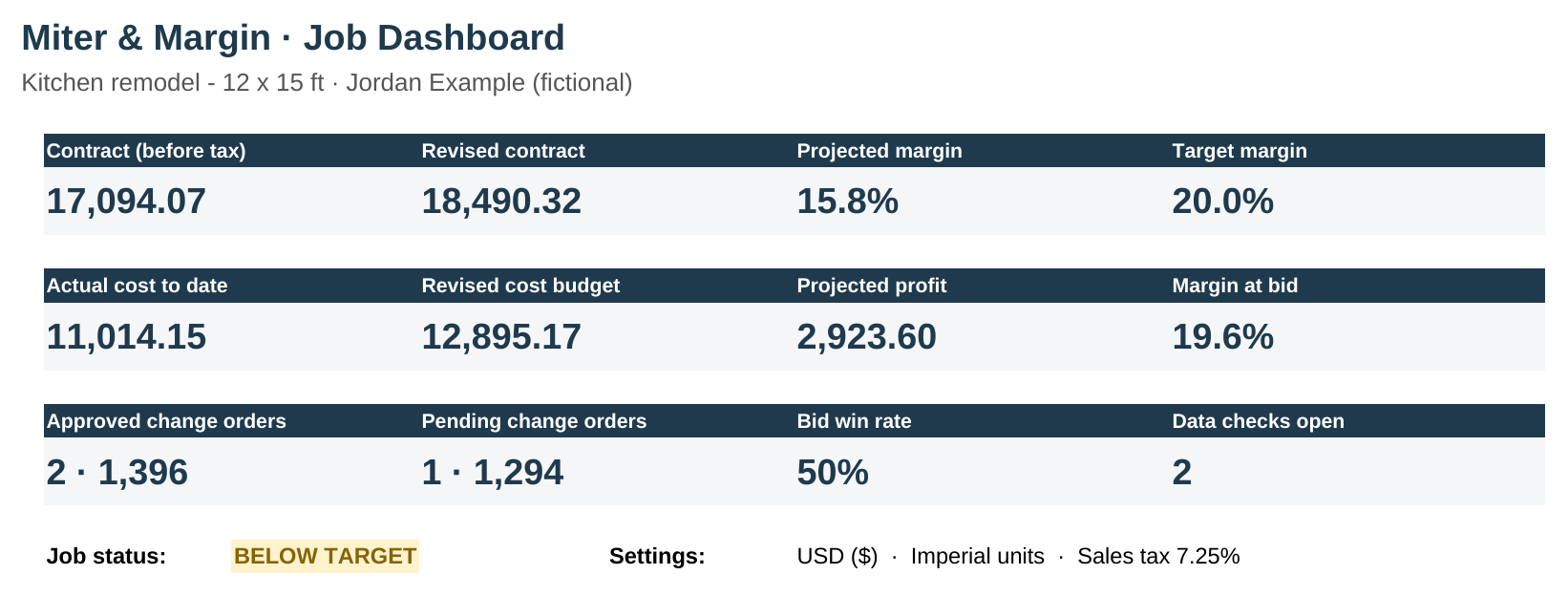
The estimate becomes the job budget. Log costs as they happen, approve change orders and enter % complete, and you get a projected final margin while there's still time to act.
How it works
One connected workbook: one file per job, twelve tabs, and you only type into the yellow cells.
Set up once
Pick your region, currency and units. Enter your tax rate, crew wages and burden, overhead recovery % and target margin.
Estimate
Pick items from your price book and enter quantities. Mark lines as base, allowance or optional. Overhead, margin and tax are worked out for you.
Propose
A print-ready proposal sheet with scope, inclusions, exclusions, allowances, optional add-ons and a payment schedule. Add your own terms and save it as a PDF.
Run the job
Log change orders and actual costs. Budget vs actual by trade and cost type, plus a projected final cost and margin.
What's inside: the real screens
These are screenshots of the actual v1 files, not mockups. Every number comes from a fictional sample kitchen job, and all prices are examples.
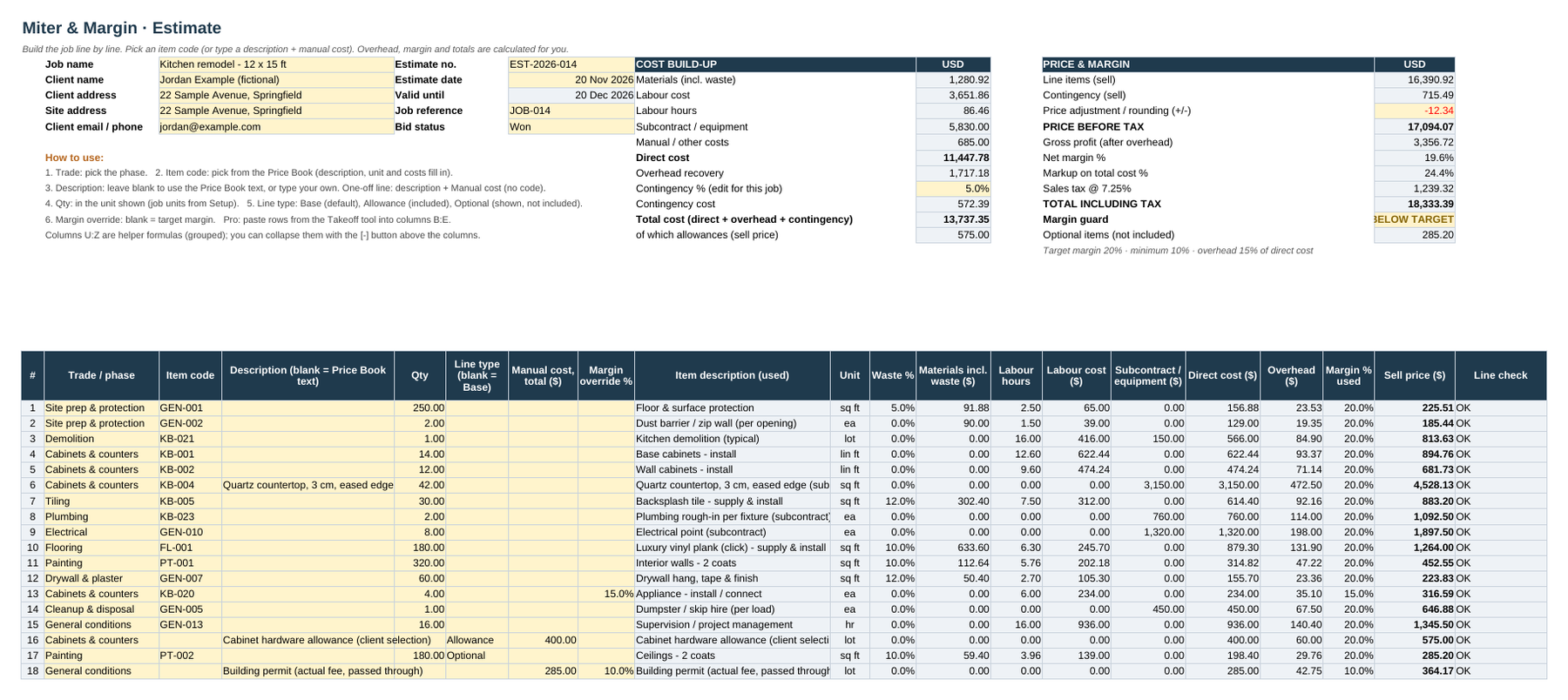
Estimate with the margin guard
Cost build-up (materials with waste, burdened labour, subcontract, overhead, contingency) on one side and price and margin on the other. The sample job comes out at 19.6% against a 20% target, so the guard says BELOW TARGET.
Client proposal
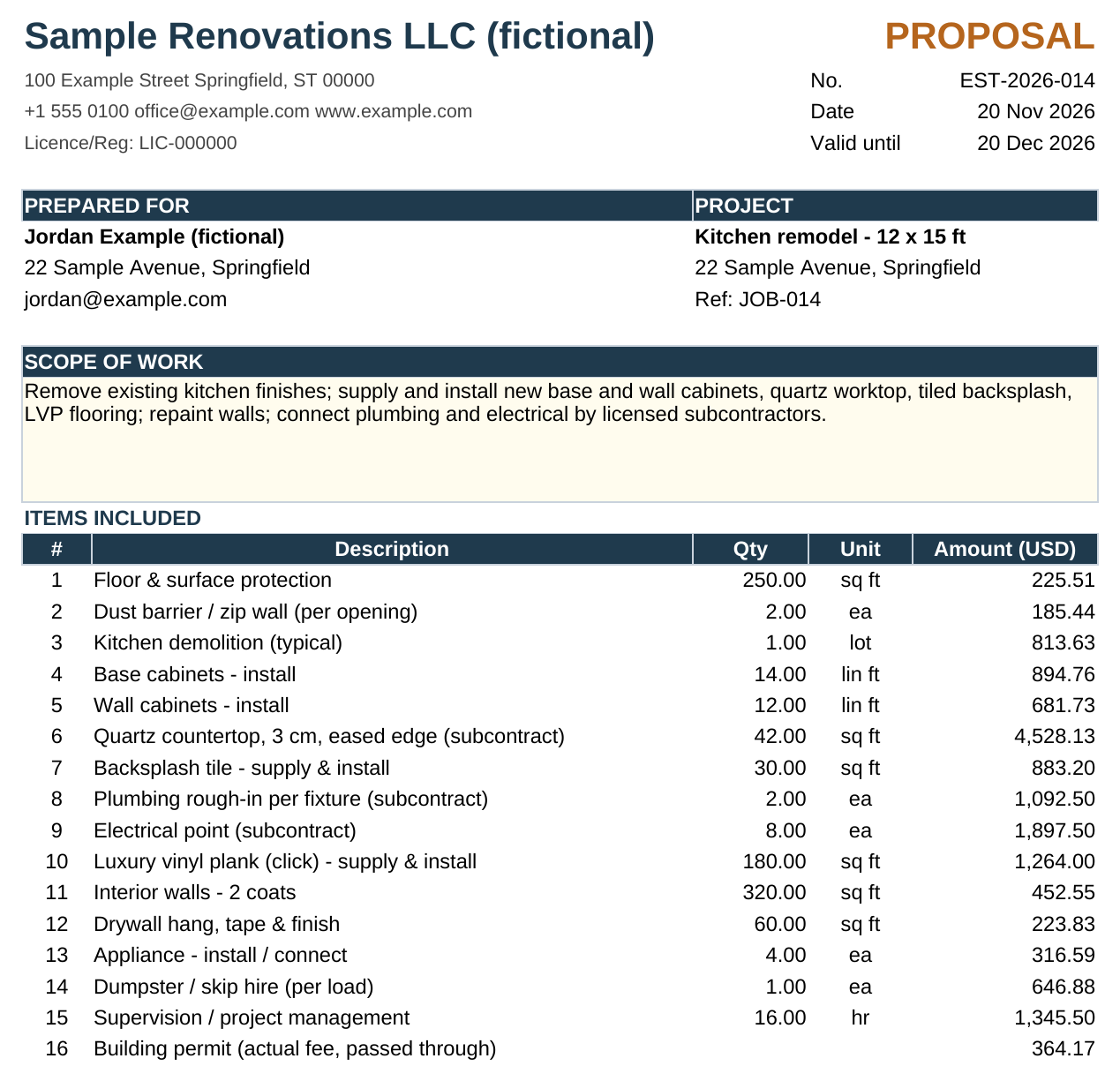
Prints one page wide. You can choose to hide line prices and show totals only. The workbook includes no legal contract wording, so you add your own terms.
Change orders
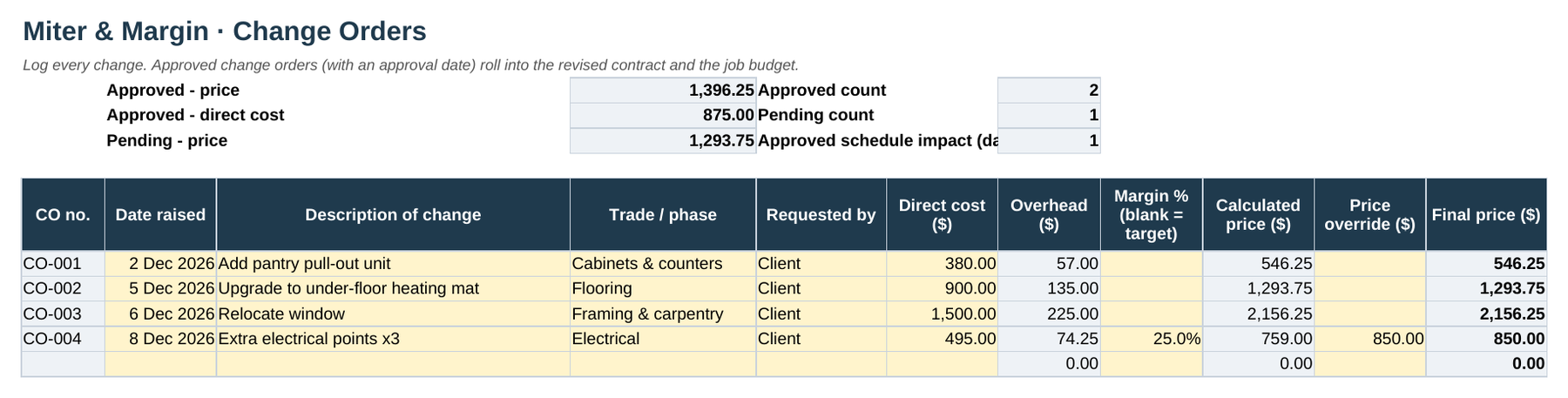
Price each change with your overhead and margin, or type an override. Approved changes roll into the revised contract and the job budget.
Built-in checks
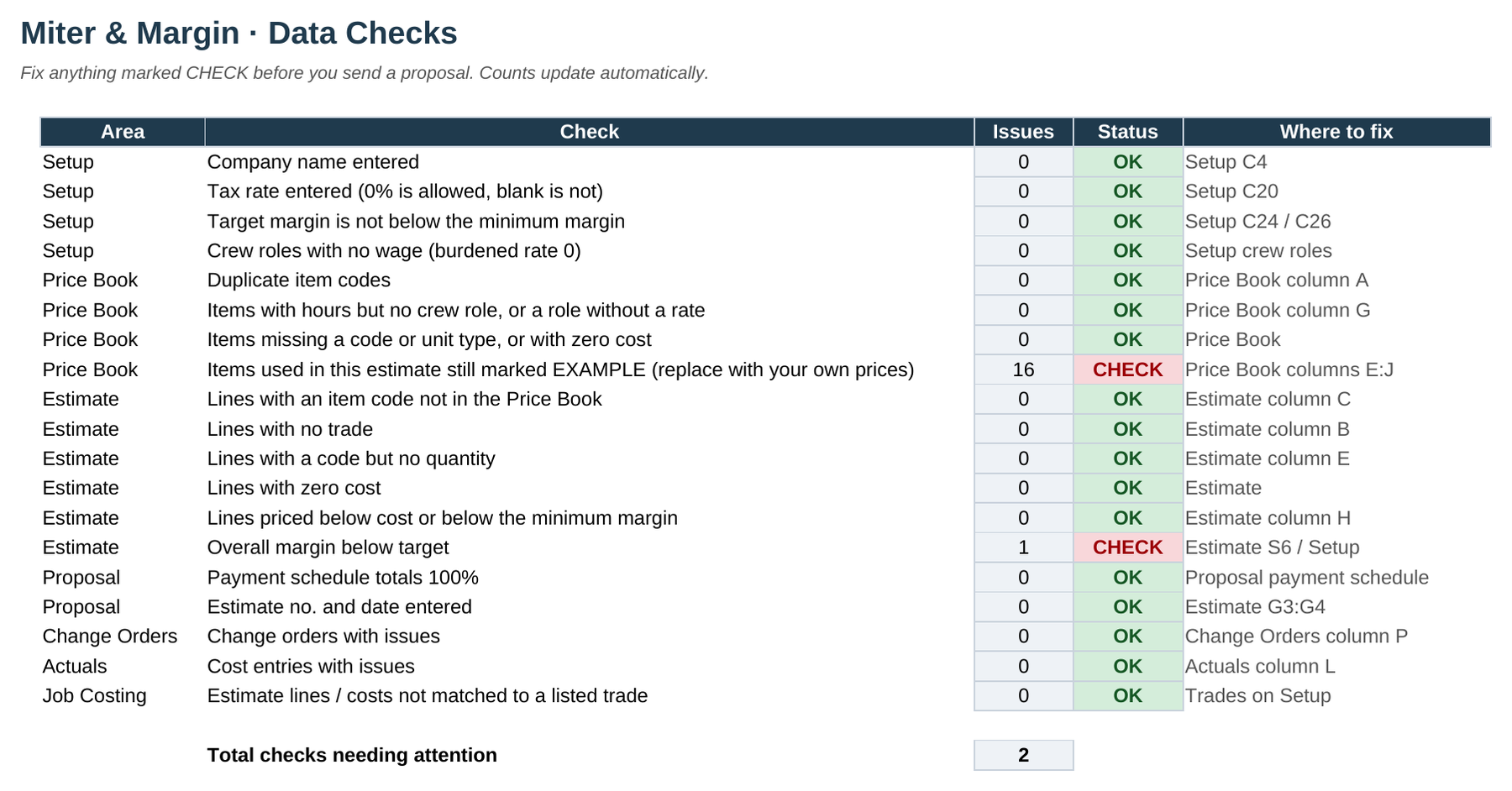
Nineteen data-quality checks catch common mistakes: missing codes, lines with no trade, prices below cost, a payment schedule that doesn't add up to 100%, and EXAMPLE prices still in use.
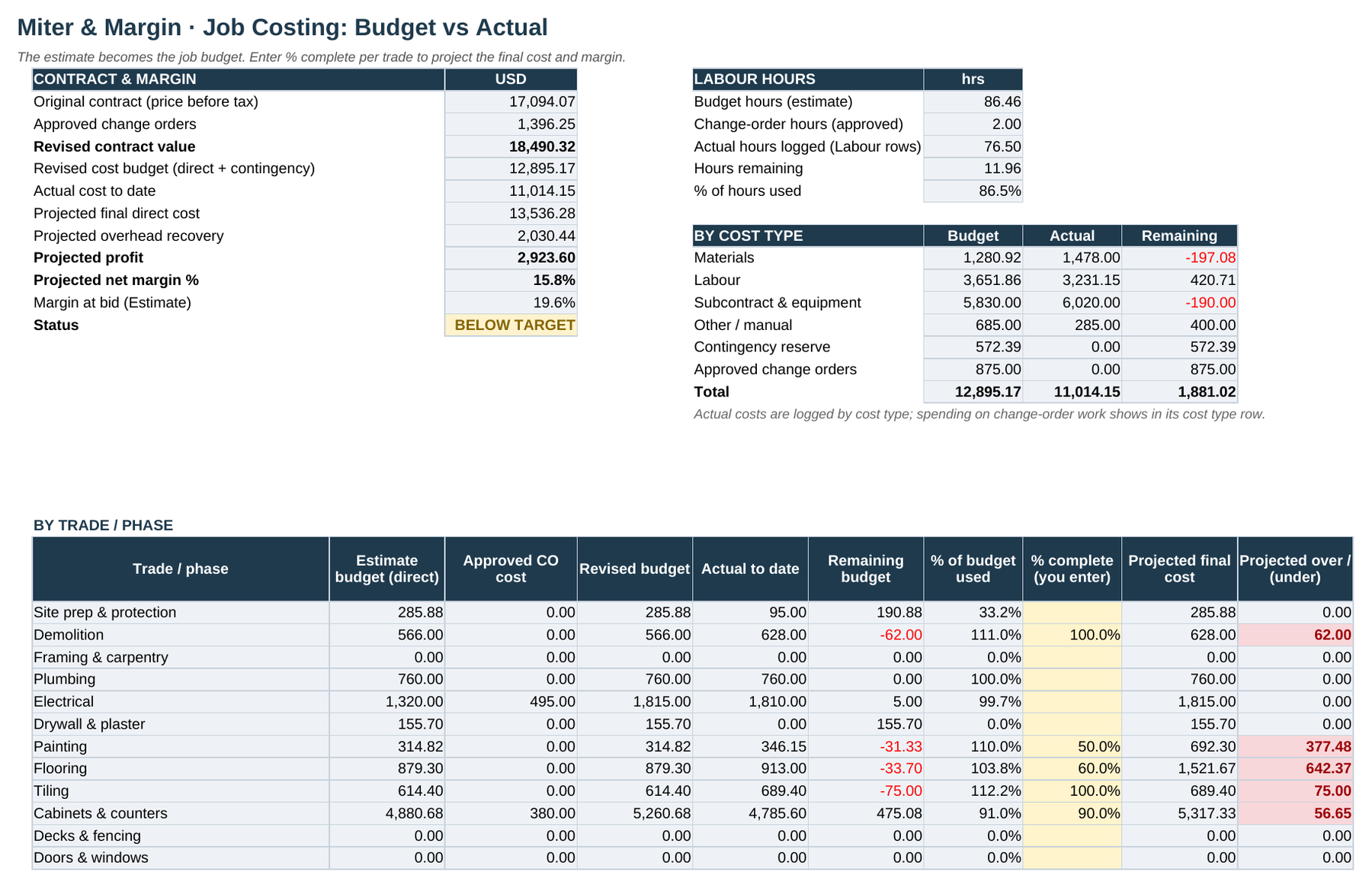
Job costing: budget vs actual
Budget, actual to date and remaining, by cost type and by trade. Enter % complete to project the final cost. In the sample, overruns on painting and flooring push the projected margin down to 15.8%.
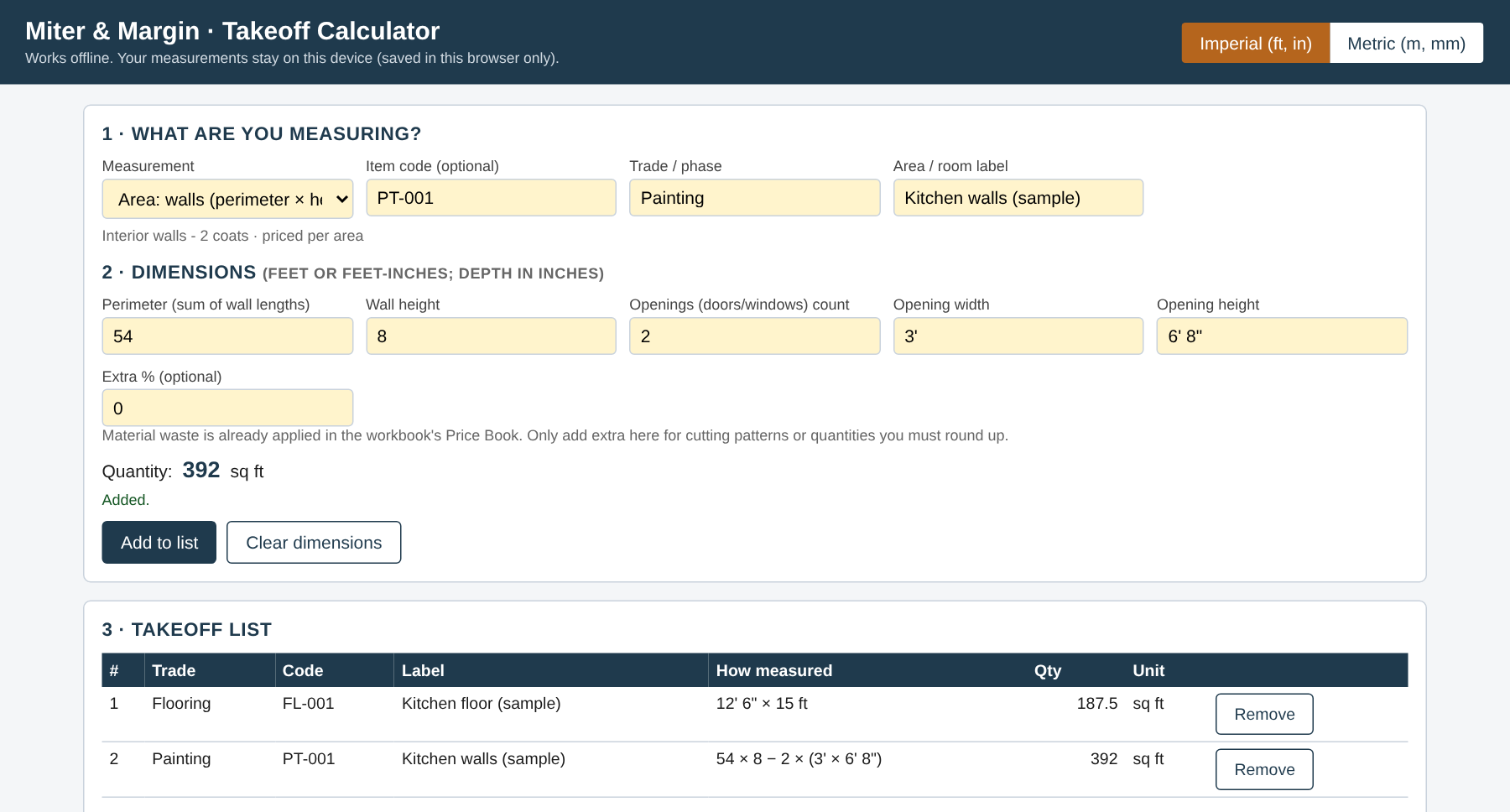
Pro: offline takeoff calculator
A single HTML file that opens in your browser with no install and no internet connection. It measures areas, walls minus openings, linear runs, counts and slab volumes in imperial or metric, then copies the rows straight into the Estimate. Your measurements are saved only in that browser.
Built for where you work
- Region: US, UK, Canada, Australia, Western Europe or Other. This sets the tax label (sales tax, VAT, GST/HST or GST).
- Currency labels: USD, GBP, CAD, AUD or EUR. Labels only, with no currency conversion.
- Units: imperial (sq ft, lin ft, cu yd) or metric (m², m, m³). Price book rates convert automatically.
- Tax rate: you enter it. The workbook never assumes one, and it isn't tax advice.
- Your file, your data: nothing is uploaded anywhere. The workbook lives on your computer or in your own cloud drive.
What it doesn't do
We'd rather you know now than ask for a refund later.
- No payroll, CIS or other tax deductions, and no accounting sync
- No e-signature, online payments or client portal
- No legal contract templates. The proposal leaves terms to you
- No takeoff from drawings or plans, and no commercial bidding
- No supplier price feeds. The starter prices are examples you replace with your own
- Not a phone app. It's a spreadsheet you use on a computer
Launch pricing
One-time price. No subscription. Prices in US dollars. Any sales tax or VAT due will be calculated and added at checkout by our reseller, depending on where you are.
Core
The complete estimate-to-job-cost workbook.
$59 one-time
- Estimate-to-job-cost workbook (.xlsx, 12 tabs)
- Price book with 20 EXAMPLE starter items
- Proposal and change-order layouts
- Job costing, dashboard, bid log and 19 checks
- Fictional sample job to learn from
- Quick-start and pricing-maths guides (PDF)
- Licence: 1 business, 1 user
Pro
Core plus four trade packs and the takeoff tool.
$89 one-time
- Everything in Core
- Trade packs: kitchen & bath, painting, flooring, decks & fencing (107 EXAMPLE items in total, .xlsx + CSV)
- Offline takeoff calculator (single HTML file)
- Licence: 1 business, 1 user
Team
The Pro kit for a small office.
$149 one-time
- Everything in Pro
- Licence: 1 business, up to 5 users
Trade Packs + Takeoff add-on
Already have Core? Add the four trade packs (kitchen & bath, painting, flooring, decks & fencing; 107 EXAMPLE items, .xlsx + CSV) and the offline takeoff calculator, without re-buying the workbook.
$26.99 one-time
Join the waitlistWhy a waitlist? We're checking there's real demand before we open sales. Joining costs nothing and commits you to nothing. When sales open, we'll email waitlist members first with launch pricing.
30-day refund: if the kit doesn't help, request a full refund within 30 days via Paddle at paddle.net. This is on top of your statutory rights. See the Refund Policy.
Get launch pricing first
Leave your email and we'll tell you when Miter & Margin goes on sale, with launch pricing. That's the only email to expect before launch.
- No payment and no reservation
- No marketing emails before launch
- We never sell or share your email for others' marketing
Questions
Can I buy it now?
Not yet. The kit is built, but sales aren't open. Join the waitlist and we'll email you when they open.
What do I need to run it?
The workbook is a standard .xlsx file built for Excel 2016 or later and Microsoft 365. It uses only common functions, with no macros, tables, XLOOKUP or dynamic arrays, so it's also designed to open in Google Sheets and LibreOffice Calc.
To be straight about testing so far: every formula has been verified in LibreOffice and checked against an independent calculation. Testing in Microsoft Excel (Windows and Mac) and Google Sheets is still on the to-do list before launch, and we'll update this answer once it's done.
Does it include real material and labour prices?
No. Every starter price is labelled EXAMPLE. They're there to show how the maths works and aren't market rates. Before you quote, replace them with your own supplier quotes and labour data. The Checks tab flags any EXAMPLE prices still used in an estimate.
Will it work for UK, Canadian, Australian or European jobs?
Yes. The settings cover region (which sets the tax label), currency labels (USD, GBP, CAD, AUD, EUR) and imperial or metric units. You enter your own tax rate. It doesn't handle CIS or other payroll deductions, and it isn't tax advice.
Is my job data uploaded anywhere?
No. The workbook is a file on your computer, or in your own Google Drive or OneDrive if you put it there. The takeoff tool runs entirely in your browser and saves only on that device. We never see your jobs or your customers.
Who will I be buying from?
When sales open, orders will be processed by Paddle.com, our online reseller and merchant of record. Paddle handles the payment, the receipt and any sales tax or VAT. The kit itself is licensed to you by Michalis Koumporelos, sole trader, trading as Miter & Margin. Card details go to Paddle only; we never see them.
What's the refund policy?
If the kit doesn't help, you can request a full refund within 30 days of purchase via Paddle at paddle.net. That guarantee is on top of any statutory rights you have where you live. See the Refund Policy.
How many people can use one licence?
Core and Pro cover one business and one user. Team covers one business and up to five users. Reselling or sharing the files outside your business isn't allowed. See the licence.
Can I change the formulas or the layout?
Yes. Formula cells are locked so you don't overwrite them by accident, but the sheets are protected without a password. You can unprotect any sheet and change it.
Do I get updates?
Your purchase covers the version you buy. We may send bug-fix updates, but future paid editions aren't included. The licence has the details.